> ## Documentation Index
> Fetch the complete documentation index at: https://docs.stratumn.com/llms.txt
> Use this file to discover all available pages before exploring further.
# Introduction to Generations
> Your way to update your workflows
# What is a Generation ?
A generation is the process of updating your workflows with **Database's data**. It triggers an **asynchronous process** in the background that will update your workflows with the latest data from your Database.
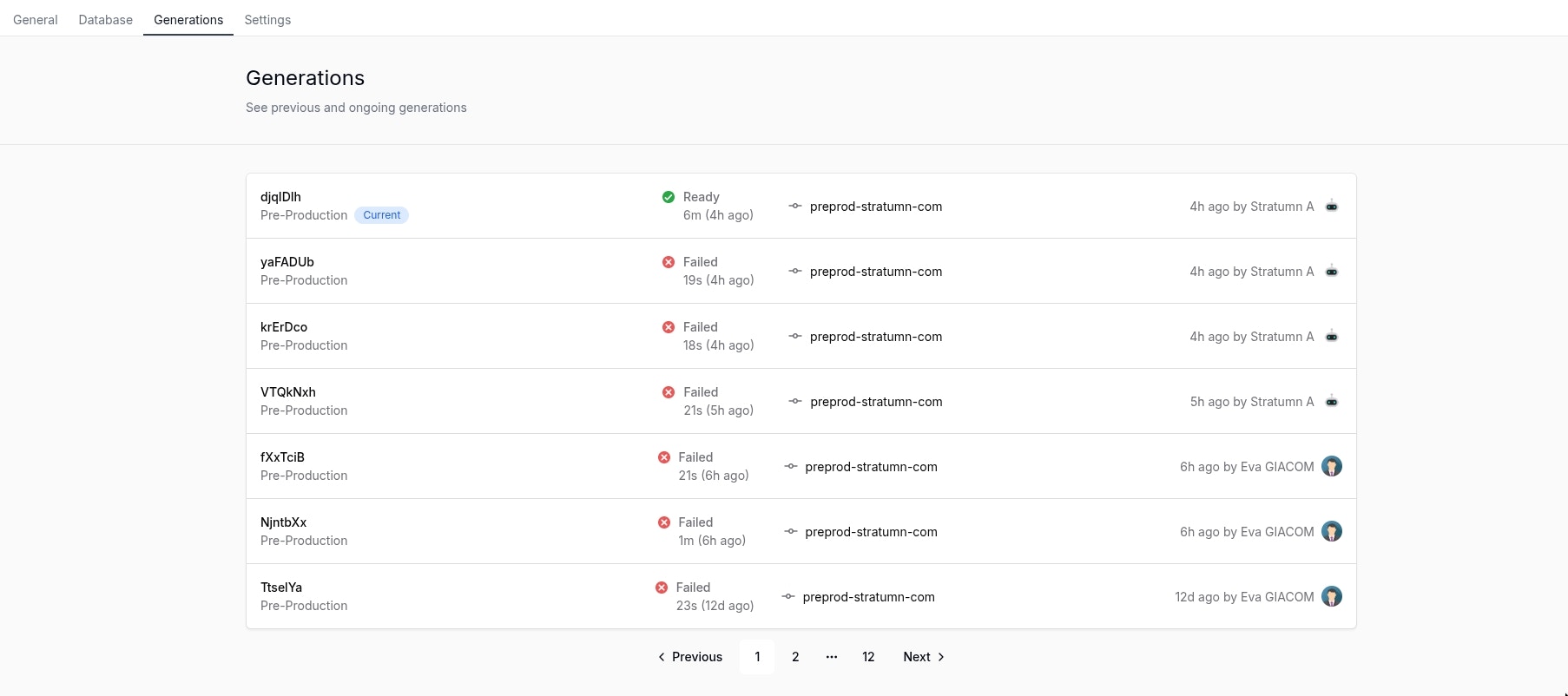 ## Generation history
The generation history is a **paginated list** of all the generations that have been triggered, it is ordered by creation date in a **descending** order.
You can find the following information in the generation history:
## Generation history
The generation history is a **paginated list** of all the generations that have been triggered, it is ordered by creation date in a **descending** order.
You can find the following information in the generation history:
 * **Generation ID**: A random ID generated by the system to identify the generation.
* **Currently deployed**: A little blue chip named **Current** will show the currently deployed generation.
* **Target environment**: The environment where the generation will be applied, it can be **Production** or **Staging** or **Pre-Production**.
* **Generation status**: The status of the generation, it can be **Pending**, **Timeout**, **Ready** or **Failed**.
* **Generation duration**: The duration of the generation.
* **Generation time elapsed**: The time elapsed since the generation was triggered.
* **Generation source**: The image source tag of the generation, reserved for Stratumn team.
* **Generation author**: The user who triggered the generation.
## Triggering a generation
To trigger a generation, you can click the **Generate button** in the top right corner of your screen.
* **Generation ID**: A random ID generated by the system to identify the generation.
* **Currently deployed**: A little blue chip named **Current** will show the currently deployed generation.
* **Target environment**: The environment where the generation will be applied, it can be **Production** or **Staging** or **Pre-Production**.
* **Generation status**: The status of the generation, it can be **Pending**, **Timeout**, **Ready** or **Failed**.
* **Generation duration**: The duration of the generation.
* **Generation time elapsed**: The time elapsed since the generation was triggered.
* **Generation source**: The image source tag of the generation, reserved for Stratumn team.
* **Generation author**: The user who triggered the generation.
## Triggering a generation
To trigger a generation, you can click the **Generate button** in the top right corner of your screen.
 The newly triggered generation will automatically be added on top the first page of generation history.
 ### Rate limit
Currently, you can trigger a maximum of **3 generations per minute**.
### Rate limit
Currently, you can trigger a maximum of **3 generations per minute**.