> ## Documentation Index
> Fetch the complete documentation index at: https://docs.stratumn.com/llms.txt
> Use this file to discover all available pages before exploring further.
# Trace
> A trace is an instance of a workflow.
## State
Each trace has a `state` object which contains the business data but also metadata about the trace's lifecycle.
The state object can be accessed in the [effects](/configuration/action/effects) via `dsl.$variables.state` and has the following properties:
The business data of the trace.
A mapping between a group label and it's next possible actions.
The most relevant next actions for each group.
The notifications that will be sent to the user.
### Data
The `dsl.$variables.state.data` property is an object that holds the business data for the trace,
structured according to the workflow's specifications.
The data are updated by the effects of each action and is usually used to display
the trace's data in the [workflow overview](/configuration/ui/introduction#workflow-overview) table and [trace infos](/configuration/ui/introduction#trace-infos).
### Next actions
The `dsl.$variables.state.nextActions` property defines which actions are available for each group.
It is defined as a map between a group label and a list of actions keys.
```ts Typescript theme={null}
type NextActions<
GroupLabel extends string,
ActionKey extends string
> = {
[key in GroupLabel]?: ActionKey[];
};
```
```json Example theme={null}
{
"cook": ["prepareOrder", "comment"],
"client": ["comment"]
}
```
### Tasks
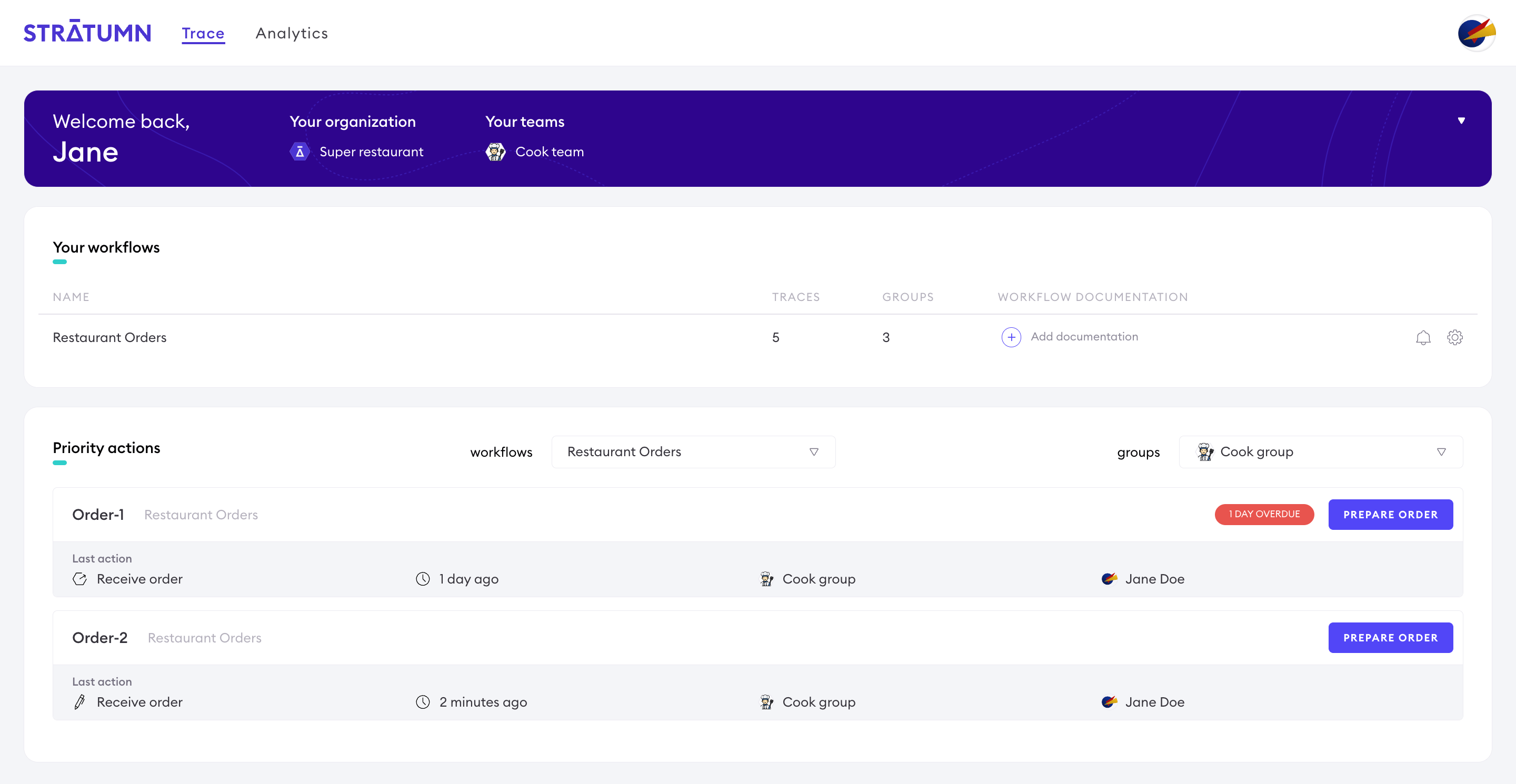
The `dsl.$variables.state.tasks` property, also referred to as *priorities*, defines which next actions are the most relevant for a group.
When a group has a next priority action defined, it will be displayed in the Trace UI homepage.
 ```ts theme={null}
{
...
tasks: {
groups: {
cook: { // the group label
responsibility: 1,
todo: ['cookOrder'] // the next priority
}
},
deadlines: [
{
date: '2025-11-20' // optional deadline
}
]
}
...
};
```
A deadline can be optionally defined for a task.
## Meta
The read-only `dsl.$variables.meta` object contains metadata about the trace, as well as the last performed action.
It is automatically generated before effects are applied and can not be modified.
It's usually used to get context about the trace in the [effects](/configuration/action/effects) or to display information using [widgets](/configuration/ui/widgets).
The date of creation of the last or current link.
Informations about the last performed action.
The key of the action.
The title of the action.
The name of the icon of the action.
Informations about the user who submitted the last link.
The id of the user.
The email of the user, it also acts as an user identifier.
The avatar's url of the user.
The full name of the user.
The first name of the user.
The last name of the user.
The type of the user.
Informations about the group of the user that submitted the last link.
The id of the group.
The label of the group, it also acts as a group identifier.
The name of the group.
The avatar's url of the group.
Informations about the workflow.
The id of the workflow. For example: `"12"`.
The state of the workflow.
The date of creation of the trace.
The name of the trace. Automatically generated using the workflow's name and the index of the trace in the workflow.
Example: `ORDER-21`
The id of the trace.
The first 6 characters of the trace id.
```ts Typescript theme={null}
type LinkMetaData = {
createdAt: string;
action: {
key: string;
title: string;
icon: string;
};
createdBy: {
type?: string;
accountId?: string;
name: string;
firstName?: string;
lastName?: string;
avatar: string | null;
email?: string;
id?: string;
};
group: {
label: string;
id: string;
name: string;
avatar: string | null;
};
traceCreatedAt: string;
traceName: string;
traceId: string;
traceShortId: string;
process: {
name: string;
state: string;
};
/** @deprecated */
owner: {
id: string;
name: string;
avatar: string | null;
};
/** @deprecated */
inputs: string[];
};
```
```json Example theme={null}
{
"head": {
"action": {
"icon": "lucide_CookingPot",
"key": "prepareOrder",
"title": "Prepare order"
},
"createdAt": "2024-10-09T15:14:42.973Z",
"createdBy": {
"avatar": "https://media-api.stratumn.com/files/111439687e669296785751469eeece665882021e1ea6",
"email": "jane.doe@example.com",
"firstName": "Jane",
"id": "888",
"lastName": "Doe",
"name": "Jane Doe",
"type": "User"
},
"group": {
"avatar": "https://media-api.stratumn.com/files/111439687e669296785751469eeece665882021e1ea6",
"id": "999",
"label": "cooks",
"name": "The cooks"
},
"inputs": [],
"owner": {
"avatar": "https://media-api.stratumn.com/files/111439687e669296785751469eeece665882021e1ea6",
"id": "999",
"name": "The cooks"
},
"process": {
"name": "12",
"state": "FREE"
}
},
"links": {
"totalCount": 9
},
"traceCreatedAt": "2024-05-03T08:33:58.533Z",
"traceId": "1f242572-3eb9-4341-986b-9cccf4121dc1",
"traceName": "ORDER-20",
"traceShortId": "1f2425"
},
```
If the query context is a widget, properties related to the last link are nested under the `head` property.
## Formdata
The `dsl.$variables.formData` object is the data submitted by the user in the current action.
```json Trace state example theme={null}
{
"data": {
"order": {
"name": "Pineapple pizza",
"date": "2024-04-24T09:16:56.316Z",
"price": 10
},
"isPaid": true,
"status": {
"progress": 0.5,
"value": "Pizza is being prepared"
},
"isTraceClosed": false,
"comments": [...],
},
"nextActions": {
"cook": ["prepareOrder", "comment"],
"client": ["comment"]
},
"tasks": {
"groups": {
"cook": {
"responsibility": 1,
"todo": ["prepareOrder"]
}
}
},
"notifications": {...}
}
```
```ts theme={null}
{
...
tasks: {
groups: {
cook: { // the group label
responsibility: 1,
todo: ['cookOrder'] // the next priority
}
},
deadlines: [
{
date: '2025-11-20' // optional deadline
}
]
}
...
};
```
A deadline can be optionally defined for a task.
## Meta
The read-only `dsl.$variables.meta` object contains metadata about the trace, as well as the last performed action.
It is automatically generated before effects are applied and can not be modified.
It's usually used to get context about the trace in the [effects](/configuration/action/effects) or to display information using [widgets](/configuration/ui/widgets).
The date of creation of the last or current link.
Informations about the last performed action.
The key of the action.
The title of the action.
The name of the icon of the action.
Informations about the user who submitted the last link.
The id of the user.
The email of the user, it also acts as an user identifier.
The avatar's url of the user.
The full name of the user.
The first name of the user.
The last name of the user.
The type of the user.
Informations about the group of the user that submitted the last link.
The id of the group.
The label of the group, it also acts as a group identifier.
The name of the group.
The avatar's url of the group.
Informations about the workflow.
The id of the workflow. For example: `"12"`.
The state of the workflow.
The date of creation of the trace.
The name of the trace. Automatically generated using the workflow's name and the index of the trace in the workflow.
Example: `ORDER-21`
The id of the trace.
The first 6 characters of the trace id.
```ts Typescript theme={null}
type LinkMetaData = {
createdAt: string;
action: {
key: string;
title: string;
icon: string;
};
createdBy: {
type?: string;
accountId?: string;
name: string;
firstName?: string;
lastName?: string;
avatar: string | null;
email?: string;
id?: string;
};
group: {
label: string;
id: string;
name: string;
avatar: string | null;
};
traceCreatedAt: string;
traceName: string;
traceId: string;
traceShortId: string;
process: {
name: string;
state: string;
};
/** @deprecated */
owner: {
id: string;
name: string;
avatar: string | null;
};
/** @deprecated */
inputs: string[];
};
```
```json Example theme={null}
{
"head": {
"action": {
"icon": "lucide_CookingPot",
"key": "prepareOrder",
"title": "Prepare order"
},
"createdAt": "2024-10-09T15:14:42.973Z",
"createdBy": {
"avatar": "https://media-api.stratumn.com/files/111439687e669296785751469eeece665882021e1ea6",
"email": "jane.doe@example.com",
"firstName": "Jane",
"id": "888",
"lastName": "Doe",
"name": "Jane Doe",
"type": "User"
},
"group": {
"avatar": "https://media-api.stratumn.com/files/111439687e669296785751469eeece665882021e1ea6",
"id": "999",
"label": "cooks",
"name": "The cooks"
},
"inputs": [],
"owner": {
"avatar": "https://media-api.stratumn.com/files/111439687e669296785751469eeece665882021e1ea6",
"id": "999",
"name": "The cooks"
},
"process": {
"name": "12",
"state": "FREE"
}
},
"links": {
"totalCount": 9
},
"traceCreatedAt": "2024-05-03T08:33:58.533Z",
"traceId": "1f242572-3eb9-4341-986b-9cccf4121dc1",
"traceName": "ORDER-20",
"traceShortId": "1f2425"
},
```
If the query context is a widget, properties related to the last link are nested under the `head` property.
## Formdata
The `dsl.$variables.formData` object is the data submitted by the user in the current action.
```json Trace state example theme={null}
{
"data": {
"order": {
"name": "Pineapple pizza",
"date": "2024-04-24T09:16:56.316Z",
"price": 10
},
"isPaid": true,
"status": {
"progress": 0.5,
"value": "Pizza is being prepared"
},
"isTraceClosed": false,
"comments": [...],
},
"nextActions": {
"cook": ["prepareOrder", "comment"],
"client": ["comment"]
},
"tasks": {
"groups": {
"cook": {
"responsibility": 1,
"todo": ["prepareOrder"]
}
}
},
"notifications": {...}
}
```