> ## Documentation Index
> Fetch the complete documentation index at: https://docs.stratumn.com/llms.txt
> Use this file to discover all available pages before exploring further.
# Notifications
Notifications are a way to communicate updates, alerts, or information to users or groups.
Usually in email format, they are sent by Notification API.
## Overview
Notifications in configuration serve multiple purposes, including:
* Alerting users about changes in workflows.
* Sending important updates or reminders via email.
* Inviting a user to take a next action on a trace...
## How it works in configuration
The notifications are not directly sent through configuration or the `dsl` package. They are stored under `state.notifications` an an array.
When performing an action on a trace, Trace API is creating a link and checking `state.notifications`. If it founds one, it will call Notification API with the correct template.
To send a notification, the data might contains variables derived from the `state` (such as `lastActionName`, `status`, etc.). Thus, notifications are usually built and sent inside the [effects](/configuration/action/effects#notifications) of an action.
The action needs to provide the correct data to the `state.notifications`, typed as `NotificationOptions` inside the `dsl` package :
### Notification Options
The title of the notification.
Identifies the user, account, or email to notify.
If filled, it will notify a group. Corresponds to the trace `group.label`, which is a camelCase string (e.g., `traceBot`, `agreTa`).
The notification channel. Defaults to `EMAIL`.
The template used for the notification layout.
```typescript theme={null}
type Template = {
type?: string; // default 'HTML'
version?: string; // default '1.0.0'
name: TemplateName;
config: TemplateConfigMap[TemplateName]; // based on TemplateName, can be SchemaFullConfig, SchemaLessConfig, NotifyForAction.
};
```
Possible values for `TemplateName`:
```typescript theme={null}
enum TemplateName = {
SCHEMA_FULL: "schema-full";
SCHEMA_MINIMAL: "schema-minimal";
SIGNUP: "signup";
MENTION: "mention";
EMPTY: "empty";
NOTIFY_FOR_ACTION: "notify-for-action";
OFFLINE: "offline";
};
```
In configuration, usually 3 are being used: `SCHEMA_FULL`, `SCHEMA_MINIMAL` and `NOTIFY_FOR_ACTION`.
Please see [below](/configuration/action/notifications#email-templates) to check all available templates.
Information about the sender. Defaults to:
* `name`: `Stratumn`
* `issuer`: Name of the microservice (e.g., `TRACE`, `OFFLINE`).
* `traceId`: ID of the current trace.
* `workflowId`: ID of the current workflow.
Usually the trace ID. Defaults to `-9999`.
The resource type. Defaults to `TRACE`.
Optional avatar URL for the notification.
Optional icon URL for the notification.
The notification message. Can be empty if `template` is used.
Custom data associated with the notification, related to attachments.
The format of the message content. Defaults to `MARKDOWN`.
Priority flag for ordering notifications in batch emails.
If `false`, no email will be sent alongside the notification.
Configuration specific to the selected template.
```typescript theme={null}
const notificationOptions = {
title: "Notification Example",
receiver: {
email: "user@example.com",
userId: "12345",
},
groupLabel: "finance",
channel: "EMAIL",
template: {
name: "schema-full",
type: "HTML",
version: "1.0.0",
config: {
traceName: "Example Trace",
traceId: "trace-1234",
workflowName: "Example Workflow",
additionalInfo: [
{ title: "Trace creation date", value: "01/01/2023" },
{ title: "Status", value: "Pending" },
],
},
},
sender: {
name: "Stratumn",
issuer: "TRACE",
traceId: "trace-1234",
workflowId: "wf-5678",
},
resourceType: "TRACE",
};
```
```typescript Send an email when doing the action "markPaymentReceivedEffect" with the template 'schema-full' theme={null}
// src/trace/workflow/definitions/functions
import {
NotificationChannel,
NotificationOptions,
TemplateName,
TemplateType,
LinkMetaData,
} from "@stratumn/dsl";
export function createNotification(
meta: Readonly>,
groupLabel: string,
data: PaymentData
): NotificationOptions {
const channel = "EMAIL" as NotificationChannel.EMAIL;
const type = "HTML" as TemplateType.HTML;
const name = "schema-full" as TemplateName.SCHEMA_FULL;
const payloadNotification: NotificationOptions = {
title: `Payment`,
groupLabel,
channel,
template: {
type,
version: "1.0.0",
name,
config: {
traceName: meta.traceName,
traceId: meta.traceId,
workflowName: "Example Workflow",
progress: data.status.progress * 100,
lastAction: {
actionName: meta.action.title,
groupName: meta.group.name,
},
nextAction: {
actionName: "test",
groupName: data.entity,
},
additionalInfo: [
{ title: "Trace creation date", value: "01/01/2025" },
{ title: "Payment Currency", value: data.paymentCurrency },
{ title: "Total Amount", value: data.totalAmount },
],
},
},
};
return payloadNotification;
}
// src/trace/workflow/actions/markPaymentReceived.ts
async function markPaymentReceivedEffect(dsl: PaymentContext) {
const { state, formData, meta } = dsl.$variables;
const { data } = state;
const { createNotification } = dsl.$functions;
const notification = createNotification(
state.meta,
state.data.entityLabel,
state.data
);
state.notifications.push(notification);
// Will push inside state.notifications the template, then it will be handled by Trace API
}
```
## Email Templates
### Schema Full
The `schema-full` template has a rich HTML structure including metadata, workflow context, trace context, etc. It is the template used when a "Last Action" and "Next Actions" from the trace are mentioned, and if any additional information are provided.
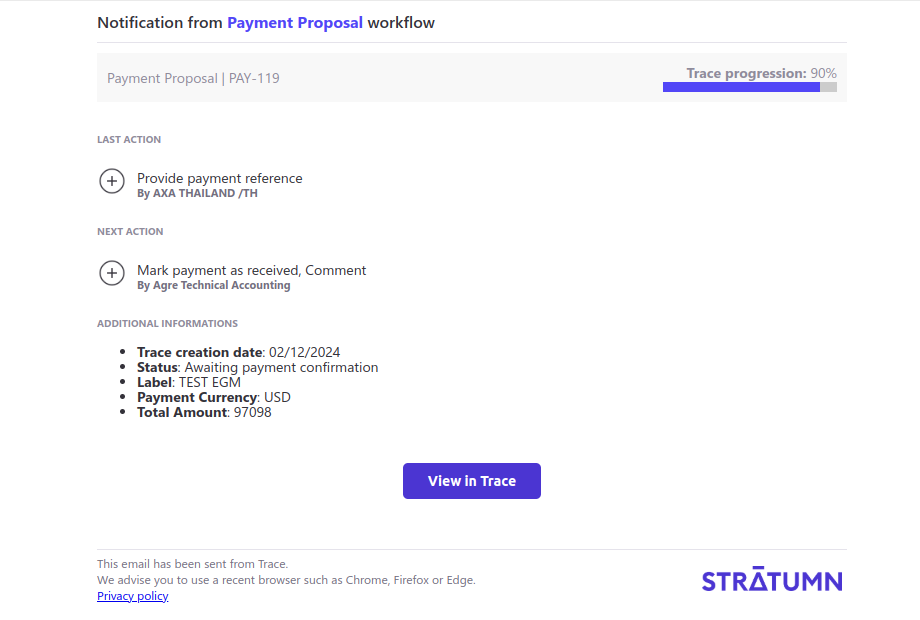 The name of the trace associated with the notification.
ID of the current trace.
The workflow name.
Progress status of the trace. Should be a number between 0 and 100, representing the percentage completion.
Represents the most recent action performed by the group associated with the previous step in the trace.
Useful for providing context about what was done prior to the current state.
* `actionName` : The name of the last action performed (e.g., 'Approve', 'Submit', 'Reject'). The value is derived from the `action.title` field in the metadata.
* `groupName` : The name of the group associated with the previous action, derived from the `group.name` field in the metadata.
Represents the next actions available to the recipient of the notification.
* `actionName` : It can be a single action name, typically one of the values in `ActionLabel` (e.g., 'Create proposal', 'Validate scope'). It can also be a concatenated string of multiple action names, separated by commas (e.g., 'Create proposal, Validate scope').If custom strings are needed, they must adhere to the format used in the application.
* `groupName` : The name of the group associated with the next action (e.g., 'agre TA').
Represents additional contextual information about the workflow or action.
Each entry consists of a `title` and a corresponding `value`:
* `title`: type `string`, A descriptive label for the information (e.g., 'Trace creation date', 'Status').
* `value`: type `string` or `number`. The associated value, which can be a string or a number (e.g., 'Pending', 1000).
Additionnal comments for the notification, in Rich Text. Will be processed as HTML String. Its type is `CommentPart[]`.
```ts theme={null}
export interface CommentPart {
type: CommentPartType;
children: CommentContent[];
isEmpty?: boolean;
}
export interface CommentContent {
text?: string;
type?: ContentType;
user?: UserInfos;
children?: CommentContent[];
isEmpty?: boolean;
italic?: boolean;
bold?: boolean;
underline?: boolean;
url?: string;
}
export enum CommentPartType {
SUBJECT = 'subject',
PARAGRAPH = 'paragraph',
H1 = 'heading-one',
UNORDERED_LIST = 'unordered-list',
TABLE = 'table'
}
export enum ContentType {
TEXT = 'text',
MENTION = 'mention',
LINK = 'link',
TABLE_ROW = 'table-row',
TABLE_CELL = 'table-cell'
}
```
```ts Typescript theme={null}
type SchemaFullConfig = {
traceName?: LinkMetaData<'traceName'>['traceName'];
traceId?: LinkMetaData<'traceId'>['traceId'];
workflowName: string;
/* Should be a number between 0 and 100, representing the percentage completion.*/
progress?: number;
/* Represents the most recent action performed by the group associated with */
/* the previous step in the workflow. */
lastAction?: {
actionName: LinkMetaData<'action'>['action']['title'];
groupName: LinkMetaData<'group'>['group']['name'];
};
nextAction?: {
actionName: string;
groupName: string;
};
additionalInfo?: Array<{ title: string; value: string | number }>;
comment?: CommentPart[];
};
```
```ts Send an email when doing the action "markPaymentReceivedEffect" with the template 'schema-full' theme={null}
// src/trace/workflow/definitions/functions
import {
NotificationChannel,
NotificationOptions,
TemplateName,
TemplateType,
LinkMetaData,
} from "@stratumn/dsl";
export function createNotification(
meta: Readonly>,
groupLabel: string,
data: PaymentData
): NotificationOptions {
const channel = "EMAIL" as NotificationChannel.EMAIL;
const type = "HTML" as TemplateType.HTML;
const name = "schema-full" as TemplateName.SCHEMA_FULL;
const payloadNotification: NotificationOptions = {
title: `Payment`,
groupLabel,
channel,
template: {
type,
version: "1.0.0",
name,
config: {
traceName: meta.traceName,
traceId: meta.traceId,
workflowName: "Workflow Example",
progress: data.status.progress * 100,
lastAction: {
actionName: meta.action.title,
groupName: meta.group.name,
},
nextAction: {
actionName: "test",
groupName: data.entity,
},
additionalInfo: [
{ title: "Trace creation date", value: "01/01/2025" },
{ title: "Payment Currency", value: data.paymentCurrency },
{ title: "Total Amount", value: data.totalAmount },
],
},
},
};
return payloadNotification;
}
// src/trace/workflow/actions/markPaymentReceived.ts
async function markPaymentReceivedEffect(dsl: PaymentContext) {
const { state, formData, meta } = dsl.$variables;
const { data } = state;
const { createNotification } = dsl.$functions;
const notification = createNotification(
state.meta,
state.data.entityLabel,
state.data
);
state.notifications.push(notification);
// Will push inside state.notifications the template, then it will be handled by Trace API
}
```
### Schema Minimal
The `schema-minimal` template is a more simple content html structure.
The name of the trace associated with the notification.
ID of the current trace.
The workflow name.
Progress status of the trace. Should be a number between 0 and 100, representing the percentage completion.
Represents the most recent action performed by the group associated with the previous step in the trace.
Useful for providing context about what was done prior to the current state.
* `actionName` : The name of the last action performed (e.g., 'Approve', 'Submit', 'Reject'). The value is derived from the `action.title` field in the metadata.
* `groupName` : The name of the group associated with the previous action, derived from the `group.name` field in the metadata.
Represents the next actions available to the recipient of the notification.
* `actionName` : It can be a single action name, typically one of the values in `ActionLabel` (e.g., 'Create proposal', 'Validate scope'). It can also be a concatenated string of multiple action names, separated by commas (e.g., 'Create proposal, Validate scope').If custom strings are needed, they must adhere to the format used in the application.
* `groupName` : The name of the group associated with the next action (e.g., 'agre TA').
Represents additional contextual information about the workflow or action.
Each entry consists of a `title` and a corresponding `value`:
* `title`: type `string`, A descriptive label for the information (e.g., 'Trace creation date', 'Status').
* `value`: type `string` or `number`. The associated value, which can be a string or a number (e.g., 'Pending', 1000).
Additionnal comments for the notification, in Rich Text. Will be processed as HTML String. Its type is `CommentPart[]`.
```ts theme={null}
export interface CommentPart {
type: CommentPartType;
children: CommentContent[];
isEmpty?: boolean;
}
export interface CommentContent {
text?: string;
type?: ContentType;
user?: UserInfos;
children?: CommentContent[];
isEmpty?: boolean;
italic?: boolean;
bold?: boolean;
underline?: boolean;
url?: string;
}
export enum CommentPartType {
SUBJECT = 'subject',
PARAGRAPH = 'paragraph',
H1 = 'heading-one',
UNORDERED_LIST = 'unordered-list',
TABLE = 'table'
}
export enum ContentType {
TEXT = 'text',
MENTION = 'mention',
LINK = 'link',
TABLE_ROW = 'table-row',
TABLE_CELL = 'table-cell'
}
```
```ts Typescript theme={null}
type SchemaFullConfig = {
traceName?: LinkMetaData<'traceName'>['traceName'];
traceId?: LinkMetaData<'traceId'>['traceId'];
workflowName: string;
/* Should be a number between 0 and 100, representing the percentage completion.*/
progress?: number;
/* Represents the most recent action performed by the group associated with */
/* the previous step in the workflow. */
lastAction?: {
actionName: LinkMetaData<'action'>['action']['title'];
groupName: LinkMetaData<'group'>['group']['name'];
};
nextAction?: {
actionName: string;
groupName: string;
};
additionalInfo?: Array<{ title: string; value: string | number }>;
comment?: CommentPart[];
};
```
```ts Send an email when doing the action "markPaymentReceivedEffect" with the template 'schema-full' theme={null}
// src/trace/workflow/definitions/functions
import {
NotificationChannel,
NotificationOptions,
TemplateName,
TemplateType,
LinkMetaData,
} from "@stratumn/dsl";
export function createNotification(
meta: Readonly>,
groupLabel: string,
data: PaymentData
): NotificationOptions {
const channel = "EMAIL" as NotificationChannel.EMAIL;
const type = "HTML" as TemplateType.HTML;
const name = "schema-full" as TemplateName.SCHEMA_FULL;
const payloadNotification: NotificationOptions = {
title: `Payment`,
groupLabel,
channel,
template: {
type,
version: "1.0.0",
name,
config: {
traceName: meta.traceName,
traceId: meta.traceId,
workflowName: "Workflow Example",
progress: data.status.progress * 100,
lastAction: {
actionName: meta.action.title,
groupName: meta.group.name,
},
nextAction: {
actionName: "test",
groupName: data.entity,
},
additionalInfo: [
{ title: "Trace creation date", value: "01/01/2025" },
{ title: "Payment Currency", value: data.paymentCurrency },
{ title: "Total Amount", value: data.totalAmount },
],
},
},
};
return payloadNotification;
}
// src/trace/workflow/actions/markPaymentReceived.ts
async function markPaymentReceivedEffect(dsl: PaymentContext) {
const { state, formData, meta } = dsl.$variables;
const { data } = state;
const { createNotification } = dsl.$functions;
const notification = createNotification(
state.meta,
state.data.entityLabel,
state.data
);
state.notifications.push(notification);
// Will push inside state.notifications the template, then it will be handled by Trace API
}
```
### Schema Minimal
The `schema-minimal` template is a more simple content html structure.
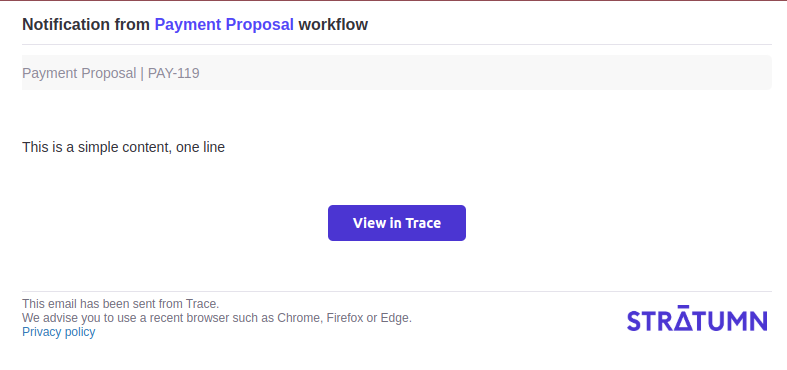 The name of the trace associated with the notification.
ID of the current trace.
The workflow name.
Free field, will be the body of the email.
```ts Typescript theme={null}
type SchemaMinimalConfig = {
traceName?: LinkMetaData<'traceName'>['traceName'];
traceId?: LinkMetaData<'traceId'>['traceId'];
workflowName: string;
additionalInfo?: Array<{ title: string; value: string | number }>;
content?: string;
};
```
```typescript Send an email when doing the action "markPaymentReceivedEffect" with the template 'schema-minimal' theme={null}
// src/trace/workflow/definitions/functions
import {
NotificationChannel,
NotificationOptions,
TemplateName,
TemplateType,
LinkMetaData,
} from "@stratumn/dsl";
export function createNotification(
meta: Readonly>,
groupLabel: string,
data: PaymentData
): NotificationOptions {
const channel = "EMAIL" as NotificationChannel.EMAIL;
const type = "HTML" as TemplateType.HTML;
const name = "schema-minimal" as TemplateName.SCHEMA_MINIMAL;
const payloadNotification: NotificationOptions = {
title: `Payment`,
groupLabel,
channel,
template: {
type,
version: "1.0.0",
name,
config: {
traceName: meta.traceName,
traceId: meta.traceId,
workflowName: "Workflow Example",
content: "This is the content of the email"
},
},
};
return payloadNotification;
}
// src/trace/workflow/actions/markPaymentReceived.ts
async function markPaymentReceivedEffect(dsl: PaymentContext) {
const { state, formData, meta } = dsl.$variables;
const { data } = state;
const { createNotification } = dsl.$functions;
const notification = createNotification(
state.meta,
state.data.entityLabel,
state.data
);
state.notifications.push(notification);
// Will push inside state.notifications the template, then it will be handled by Trace API
}
```
### Notify For Action
The `notify-for-action` template is a notification prompting the user to take an action.
The name of the trace associated with the notification.
ID of the current trace.
The workflow name.
Free field, will be the body of the email.
```ts Typescript theme={null}
type SchemaMinimalConfig = {
traceName?: LinkMetaData<'traceName'>['traceName'];
traceId?: LinkMetaData<'traceId'>['traceId'];
workflowName: string;
additionalInfo?: Array<{ title: string; value: string | number }>;
content?: string;
};
```
```typescript Send an email when doing the action "markPaymentReceivedEffect" with the template 'schema-minimal' theme={null}
// src/trace/workflow/definitions/functions
import {
NotificationChannel,
NotificationOptions,
TemplateName,
TemplateType,
LinkMetaData,
} from "@stratumn/dsl";
export function createNotification(
meta: Readonly>,
groupLabel: string,
data: PaymentData
): NotificationOptions {
const channel = "EMAIL" as NotificationChannel.EMAIL;
const type = "HTML" as TemplateType.HTML;
const name = "schema-minimal" as TemplateName.SCHEMA_MINIMAL;
const payloadNotification: NotificationOptions = {
title: `Payment`,
groupLabel,
channel,
template: {
type,
version: "1.0.0",
name,
config: {
traceName: meta.traceName,
traceId: meta.traceId,
workflowName: "Workflow Example",
content: "This is the content of the email"
},
},
};
return payloadNotification;
}
// src/trace/workflow/actions/markPaymentReceived.ts
async function markPaymentReceivedEffect(dsl: PaymentContext) {
const { state, formData, meta } = dsl.$variables;
const { data } = state;
const { createNotification } = dsl.$functions;
const notification = createNotification(
state.meta,
state.data.entityLabel,
state.data
);
state.notifications.push(notification);
// Will push inside state.notifications the template, then it will be handled by Trace API
}
```
### Notify For Action
The `notify-for-action` template is a notification prompting the user to take an action.
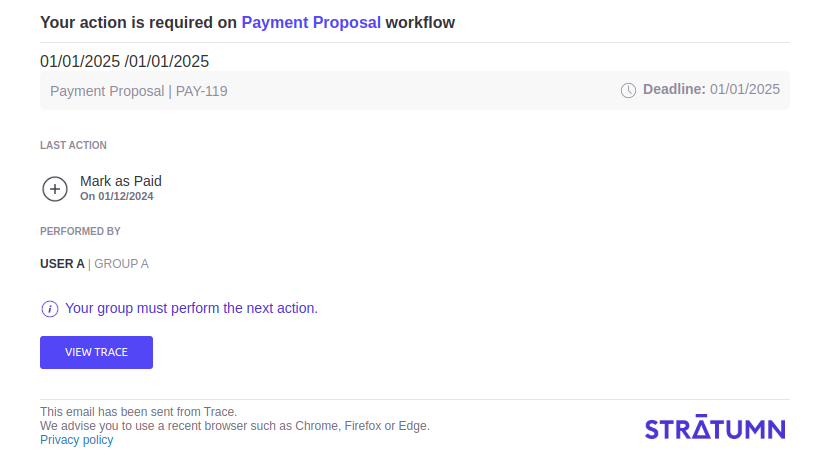 The name of the trace associated with the notification.
URL link of the trace
The workflow name.
Name of the last action on the trace.
Date of the last action on the trace.
Name of the user that made the last action on the trace.
Name of the group that made the last action on the trace.
Deadline date, prompting the user to take the next action.
```ts Typescript theme={null}
type NotifyForAction = {
workflowName: string;
lastActionName: string;
lastActionDate: string;
lastUserName: string;
lastUserGroup: string;
deadlineDate?: string;
traceName: string;
traceLink: string;
};
```
```typescript Send an email when doing the action "markPaymentReceivedEffect" with the template 'notify-for-action' theme={null}
// src/trace/workflow/definitions/functions
import {
NotificationChannel,
NotificationOptions,
TemplateName,
TemplateType,
LinkMetaData,
} from "@stratumn/dsl";
export function createNotification(
meta: Readonly>,
groupLabel: string,
data: PaymentData
): NotificationOptions {
const channel = "EMAIL" as NotificationChannel.EMAIL;
const type = "HTML" as TemplateType.HTML;
const name = "notify-for-action" as TemplateName.NOTIFY_FOR_ACTION;
const payloadNotification: NotificationOptions = {
title: `Payment`,
groupLabel,
channel,
template: {
type,
version: "1.0.0",
name,
config: {
traceName: meta.traceName,
traceId: meta.traceId,
workflowName: "Workflow Example",
lastActionName: data.lastAction.name;
lastActionDate: data.last;
lastUserName: "USER A";
lastUserGroup: "GROUP A";
deadlineDate?: "01/01/2026";
traceLink: "https://api.com/pay_199";
},
},
};
return payloadNotification;
}
// src/trace/workflow/actions/markPaymentReceived.ts
async function markPaymentReceivedEffect(dsl: PaymentContext) {
const { state, formData, meta } = dsl.$variables;
const { data } = state;
const { createNotification } = dsl.$functions;
const notification = createNotification(
state.meta,
state.data.entityLabel,
state.data
);
state.notifications.push(notification);
// Will push inside state.notifications the template, then it will be handled by Trace API
}
```
```
```
The name of the trace associated with the notification.
URL link of the trace
The workflow name.
Name of the last action on the trace.
Date of the last action on the trace.
Name of the user that made the last action on the trace.
Name of the group that made the last action on the trace.
Deadline date, prompting the user to take the next action.
```ts Typescript theme={null}
type NotifyForAction = {
workflowName: string;
lastActionName: string;
lastActionDate: string;
lastUserName: string;
lastUserGroup: string;
deadlineDate?: string;
traceName: string;
traceLink: string;
};
```
```typescript Send an email when doing the action "markPaymentReceivedEffect" with the template 'notify-for-action' theme={null}
// src/trace/workflow/definitions/functions
import {
NotificationChannel,
NotificationOptions,
TemplateName,
TemplateType,
LinkMetaData,
} from "@stratumn/dsl";
export function createNotification(
meta: Readonly>,
groupLabel: string,
data: PaymentData
): NotificationOptions {
const channel = "EMAIL" as NotificationChannel.EMAIL;
const type = "HTML" as TemplateType.HTML;
const name = "notify-for-action" as TemplateName.NOTIFY_FOR_ACTION;
const payloadNotification: NotificationOptions = {
title: `Payment`,
groupLabel,
channel,
template: {
type,
version: "1.0.0",
name,
config: {
traceName: meta.traceName,
traceId: meta.traceId,
workflowName: "Workflow Example",
lastActionName: data.lastAction.name;
lastActionDate: data.last;
lastUserName: "USER A";
lastUserGroup: "GROUP A";
deadlineDate?: "01/01/2026";
traceLink: "https://api.com/pay_199";
},
},
};
return payloadNotification;
}
// src/trace/workflow/actions/markPaymentReceived.ts
async function markPaymentReceivedEffect(dsl: PaymentContext) {
const { state, formData, meta } = dsl.$variables;
const { data } = state;
const { createNotification } = dsl.$functions;
const notification = createNotification(
state.meta,
state.data.entityLabel,
state.data
);
state.notifications.push(notification);
// Will push inside state.notifications the template, then it will be handled by Trace API
}
```
```
```